
Getting Started
Nova runs on your computer, talks with you by voice, and uses Codex to carry out coding tasks.
1. Prepare your computer
To run from source, install Node.js 22.13 or later, npm, Git, and Codex. Sign in to Codex before starting Nova.
To use OpenCode, CodeBuddy, Pi or DeepSeek Harness for coding instead, install it as well and pick it in Settings; see Coding.
Native components also need a platform toolchain:
- macOS: Xcode Command Line Tools (
xcode-select --install). - Windows: Visual Studio Build Tools with Desktop development with C++.
- Ubuntu 22.04+ x64: a C/C++20 compiler (GCC 12 or newer), X11 or XWayland, and permission to use Chromium user namespaces.
Desktop targets macOS arm64, Windows x64, and Ubuntu 22.04+ x64.
2. Install and start
Install or upgrade
npm install --global nova-personal-agent@latest
novapersonal
To upgrade, quit Nova and run the same command. Pin a version with nova-personal-agent@0.4.0. Upgrades keep your local settings and data; moving back to an older version does not roll back data changes, so back up your Nova data first.
When switching from nova-audio-agent, first run npm uninstall --global nova-audio-agent to avoid command-link collisions, then install the new package. This preserves your local data and settings.
For headless Ubuntu 22.04+ x64, use npm install --global nova-personal-agent-server@latest.
For development from source:
git clone https://github.com/deepnovacore/NovaPersonalAgent.git nova-personal-agent
cd nova-personal-agent
npm ci
cp .env.example .env
Add the voice credential to .env:
DASHSCOPE_API_KEY=your-dashscope-keyThe same key covers memory, the camera and web search, which uses Bailian search until you add TAVILY_API_KEY. A feature whose key is missing stays off, and Settings shows the key it needs. Without a key, the desktop opens a setup window on first launch. Start the desktop:
npm run start:clientWhen running from source, the project .env takes precedence over matching shell variables. Restart the desktop after editing it.
3. Give Nova a task
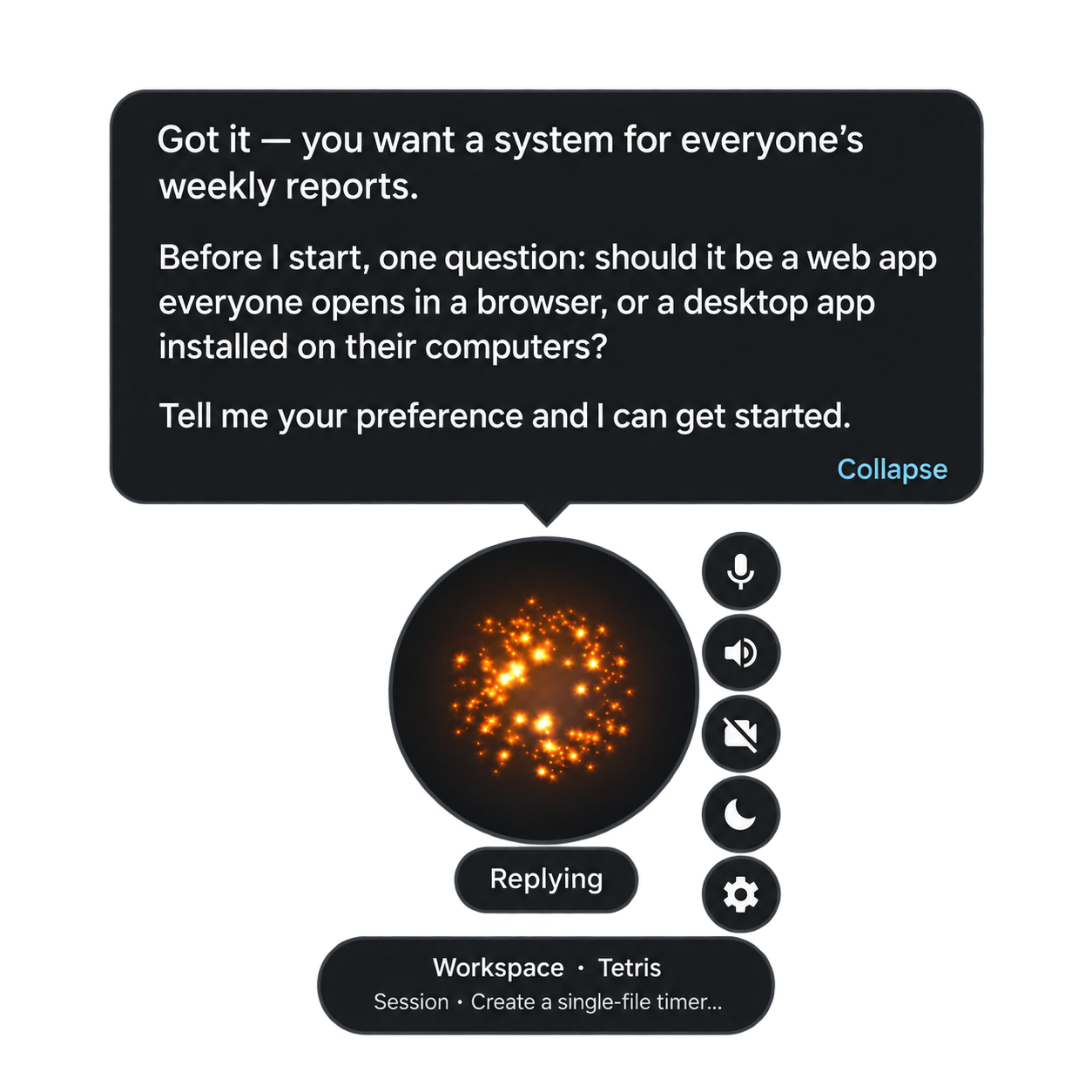
Try: “Create a webpage to showcase my work.” Nova asks for any missing information, requests confirmation when creating or switching projects, and sends the task to Codex.
You can add requirements, ask about progress, or request a stop. The task banner shows work status; bubbles provide brief updates. Operations that need permission have a separate approval prompt.
A project is a directory containing your files. A session is an ongoing Codex conversation within that project. You can start a new session without discarding project files, or continue an existing session.
4. Change settings
Choose Chinese or English in Settings for the interface and AI system prompts. When local wake detection is enabled, both “你好星核” and “Hi Nova” are available.
Right-click the orb and open Settings.
- 保存 (Save) stores changes. Service settings show a pending-restart notice.
- 重启 (Restart) starts the backend with saved settings and preserves unsaved drafts.
- Appearance and wake-word changes apply immediately after saving.
Keys are write-only: the panel shows presence, not their values. Edit .env to change keys managed by that file.
Choose a voice mode
| Mode | How it works | Defaults |
|---|---|---|
integrated |
One model handles speech directly | Qwen qwen-audio-3.0-realtime-plus, voice longanqian |
cascaded |
Separate recognition, language model and speech synthesis | Volcengine ASR -> DeepSeek deepseek-flash -> Volcengine TTS |
Integrated mode can also use StepFun (INTEGRATED_PROVIDER=stepfun, preview) with STEPFUN_API_KEY.
One key per platform is reused across selected services: DeepSeek uses DEEPSEEK_API_KEY; Qwen uses DASHSCOPE_API_KEY; Volcengine speech uses DOUBAO_BIGMODEL_API_KEY. An optional DOUBAO_ASR_API_KEY overrides recognition credentials; the ASR fallback is DOUBAO_BIGMODEL_API_KEY.
Ark is an explicit cascaded LLM option using ARK_API_KEY. The conditional Settings Panel shows only the selected mode's controls. Service settings take effect on the backend's next launch. Nova does not automatically fail over to another provider.
Enable a wake word
Local wake-word detection is off by default. Enabling it downloads the model on first use. The orb hides after 60 idle seconds by default; choose 30–3600 seconds, or 0 to disable automatic hiding.
While asleep, microphone input goes to local wake detection. Explicit mute stops detection too; unmute manually to resume.
Choose the main window
Desktop launches into one of three views, controlled by the startupView setting: orb starts hidden as a floating orb, workbench opens the full window (the default), and last reopens whichever view was active when Nova last closed. Run npm run start:workbench to open Workbench for a single launch regardless of the saved setting. See Workbench.
5. Memory, documents and iPhone
- Personal memory is on by default and stored locally in the unified memory ledger; inspect, correct or forget entries from the Workbench's Profile page. mem0 remains available as an explicit alternative. See personal memory.
- Document knowledge is enabled in capability settings. Review the data-processing notice before importing files; embedding sends text to your configured model service.
- iPhone connection: on macOS, choose “连接 iPhone…” from the orb menu, enable the phone service, and follow the network and QR-code instructions. See remote service and pairing.
Troubleshooting
| Problem | What to check |
|---|---|
| macOS says the app is "damaged" | The app is unsigned and a browser download carries a quarantine flag. Move it to Applications, run xattr -dr com.apple.quarantine "/Applications/Nova Personal Agent Desktop.app", then open it again |
| Voice cannot connect | Credentials, service access and connectivity for the selected mode |
| Codex cannot run | Codex sign-in and access to the project directory |
| Saved settings have no effect | Look for the pending-restart notice and restart the backend |
| Search is unavailable | Search credentials; Bailian or other MCP search also needs the selected service enabled |
| A recent fact is missing | Learning takes time; check its state in the memory panel |
| iPhone has no text-chat option | The host must use cascaded mode and support editable input |
Advanced configuration
Capabilities are stored in ~/.nova-audio-agent/capabilities.json. Disable unneeded modules or configure external MCP services and their allowed tools. Only enabled services need credentials.
Search uses Tavily when TAVILY_API_KEY is set, otherwise Bailian MCP search with DASHSCOPE_API_KEY, otherwise it stays off. MCP search uses its own service credentials and does not need a Tavily key. Remote MCP requires HTTPS; unauthenticated local testing can use loopback HTTP.
For implementation details, see the architecture guide.